
PPSS22 Emulator - PS2 Emulator
Blue Oliver'sLibraries & Demo
3.2638.00 Reviews
- Version
- 1699
- Installs
- 1.00M
- Age Rating
- Everyone
Screenshots
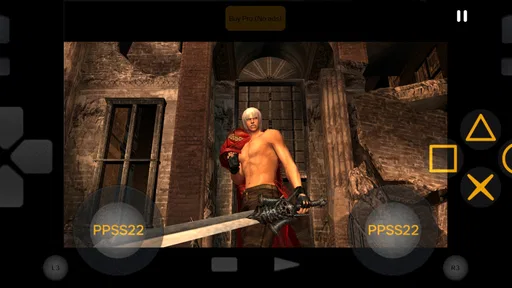
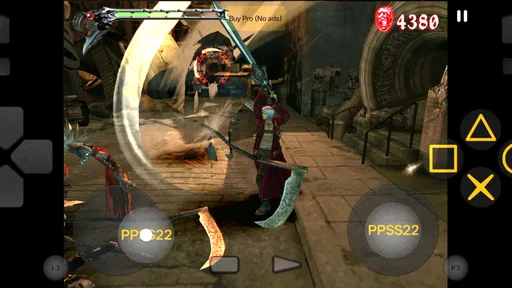
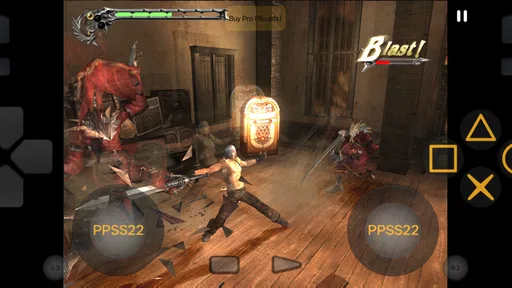
Our Review of PPSS22 Emulator - PS2 Emulator
 Analysis by Appyee
I approach PPSS22 Emulator - PS2 Emulator as a way to explore older console gaming on a phone, not as a promise that every game will run like it did on original hardware. That distinction matters: emulation asks a mobile device to recreate another system’s work, so speed and consistency can vary from one game and handset to another. If you enjoy experimenting with settings and are comfortable bringing your own game files, the idea is appealing; if you want a ready-to-play library with predictable results, this may not be the simplest route.
What to expect from speed
On an emulator, “fast” is not one fixed result. A title that spends much of its time in simple scenes may feel comfortable on a phone that struggles when the action gets busy. I would judge the experience by testing the particular game you want to play, rather than assuming that a smooth opening means every later section will be equally steady.
That is especially useful before settling into a long session. Try a representative stretch of play, including a scene with several moving elements or effects, and notice whether controls remain responsive and audio and visuals stay in step. If performance dips, changing the graphics balance toward lighter rendering is a sensible first experiment; raising visual quality is better saved for a device and game that already feel stable.
When a game puts more pressure on the phone
Long play sessions and visually busy moments are where small annoyances become easier to notice. A phone may warm up, consume battery faster, or become less comfortable to hold, and demanding emulation can make those trade-offs more apparent than casual use. I would avoid treating a short successful test as a guarantee for an evening of uninterrupted play.
A practical routine is to test at the same brightness and with the same controller setup you expect to use, then take a break if the phone becomes uncomfortably warm. If a game begins to stutter, close other demanding apps and try a less demanding graphics setting before deciding the title is unusable. Those steps are ordinary troubleshooting, not a guarantee that every slowdown can be fixed.
Stability, saves, and getting back into a game
Reliability is more than whether a game launches. I also care about whether I can return to a session without losing progress, and save states make that kind of stop-and-resume play convenient. I would still keep normal in-game saving in mind whenever a title offers it: a quick state is useful for pausing at an awkward moment, but it is wise not to make one temporary save the only copy of meaningful progress.
If something goes wrong, change one setting at a time and retest the same scene. That makes it easier to tell whether a graphics adjustment helped, instead of changing several options and losing track of what caused the difference. Compatibility can also be title-specific, so a problem with one game does not automatically tell you how another will behave.
How much your device matters
PPSS22 Emulator is an Android app from Blue Oliver's in the Libraries & Demo category. It is free, rated for Everyone, and requires Android 8.0 or later; its current version is 415. That makes it accessible to a broad range of Android users, but the minimum operating-system requirement should not be mistaken for a guarantee that every compatible phone has enough processing headroom for demanding games.
With an older or entry-level phone, I would keep expectations modest and test before building a routine around the app. A newer, more capable device is a better bet for sustained play, though even then the specific game matters. The usual alternative is original hardware, which avoids mobile performance tuning but is less convenient to carry; another emulator may suit someone who prioritizes a different interface or compatibility behavior, but switching apps cannot make a weak device powerful.
The app has been available since July 29, 2023, and has passed one million installs. Its average rating is 3.4 from around 23,000 ratings, alongside 565 written reviews. I take that as a reason to approach it with balanced expectations rather than treating popularity as proof that every setup works equally well. The price removes a purchase decision, but the time spent testing games and controls is still part of the experience.
Setup and Interface
First things first, getting the PPSS22 Emulator - PS2 Emulator up and running is a breeze. You don’t need to be a tech wizard to set it up. The installation process is straightforward, and the app guides you through the initial setup. Once you’ve got it installed, you can easily load your favorite PS2 ROMs.
The interface is pretty intuitive. It’s designed to make navigation as smooth as possible, with all your games neatly listed and ready to go. I was impressed with how clean and organized everything looked. It doesn’t bombard you with ads or unnecessary features, which is a big plus!
Performance and Compatibility
Now, onto the juicy part—how well does it actually perform? I tested a variety of games, from action-packed titles to more relaxed adventures, and I must say, the performance was generally impressive. Most games ran smoothly, with minimal lag or stuttering, even during intense gaming sessions.
However, it’s worth noting that performance can vary depending on your device’s specs. More powerful devices will obviously handle games better, but even on mid-range phones, the emulator did a pretty decent job. The compatibility with different games is also quite extensive, though there are a few titles that might give you trouble. Still, for most popular games, you’re likely to have a good experience.
Customization and Features
One of the standout features of the PPSS22 Emulator is its customization options. You can tweak the controls to fit your preferences, which is fantastic for those who like a personalized gaming experience. The on-screen controls are responsive and can be adjusted in size and layout, making them comfortable to use.
Moreover, the emulator supports external controllers, which is a game-changer if you prefer a more traditional setup. Save states are another handy feature, allowing you to pick up right where you left off without any hassle.
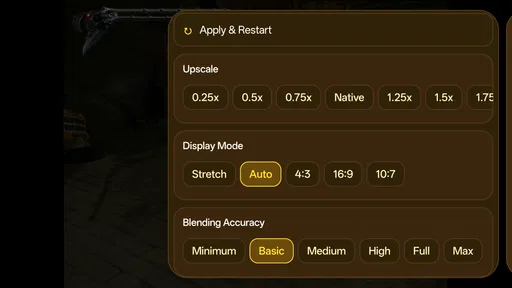
Let’s not forget about the graphics settings. You can fine-tune the visuals to either enhance performance or boost graphics quality. This flexibility means you can tailor the experience to suit your device’s capabilities and your personal preferences.
Final Thoughts
All in all, the PPSS22 Emulator - PS2 Emulator is a solid choice for anyone looking to dive back into their favorite PS2 classics on the go. It offers a user-friendly interface, solid performance, and plenty of customization options to enhance your gaming experience.
If you’re a fan of retro gaming or just want to revisit some of your childhood favorites, give this emulator a shot. It’s like carrying a piece of gaming history in your pocket, ready to be unleashed whenever nostalgia strikes.
A useful way to fit it into everyday play
For me, the strongest use case is a short, planned session rather than assuming the phone can replace a console for every situation. Imagine having a few minutes during a commute or while waiting for an appointment: a saved position lets you pause at a natural stopping point and continue later. On a bigger screen at home, an external controller can make longer play more comfortable, while the touchscreen is handy when carrying extra gear would be a nuisance.
There is a trade-off in that flexibility. Touch controls put every input on the display, so games that rely on quick combinations may feel cramped until you adjust their size and layout. I would spend a little time arranging the controls before judging a game, then keep that layout consistent while testing. A controller is the better choice when precision matters, but it is one more thing to charge or carry.
Files and compatibility in practice
One question worth answering before installation is where your games come from. An emulator is not the same thing as a library of included games; you need compatible game files that you are entitled to use. Keep those files organized in a location you can find again, and avoid moving or renaming them during a session if you are trying to diagnose a launch problem. A tidy folder structure is a small step that saves confusion when you have several titles to test.
For a first trial, choose one game you know well rather than loading a large collection at once. Check that it opens, that the controls suit it, and that you can save and resume in the way you expect. This gives you a useful baseline and makes a later compatibility issue easier to identify. If a particular title fails, try a second one before concluding that the emulator itself is unusable; emulation results can differ between games.
Who will enjoy it, and who may prefer another route
I can see this appealing to Android users who already have suitable game files, like revisiting console-era titles, and do not mind a bit of setup. It is also a reasonable fit for someone who wants to compare touch controls with a physical controller and adjust the experience to the phone. The free price makes it easier to try, but it does not remove the need for patience when a game requires troubleshooting.
I would steer away from it if you expect a curated catalogue that can be played immediately, need guaranteed compatibility for one specific title, or dislike changing settings. Someone who values the most predictable performance may prefer playing on the original console, while a person who mainly wants casual mobile games may find native Android games simpler and less demanding. Those alternatives solve different problems; an emulator’s appeal is access to a particular style of older gaming, not convenience in every respect.
My performance verdict
The practical question is not simply whether this app is fast, but whether your phone, chosen game, and preferred controls work well together. I would start with modest graphics settings, test a demanding scene, and make a save before a longer session. If play stays responsive, you can cautiously improve the visuals; if it does not, lowering demands or choosing a less troublesome title is more useful than repeatedly changing unrelated options.
Overall, I see this as a worthwhile free experiment for curious retro players who are comfortable with the basics of emulation. The clean interface and adjustable controls make it approachable, while device limits and game-by-game variation keep it from being a guaranteed plug-and-play experience. Try it with one familiar title first, and you will quickly learn whether its balance of portability, setup, and performance suits the way you want to play.
Privacy and Permissions
See what permissions an app requests and how it handles your data.
- Photos/Media/Files
- read the contents of your USB storage, modify or delete the contents of your USB storage
- Storage
- read the contents of your USB storage, modify or delete the contents of your USB storage
- Other
- view network connections, pair with Bluetooth devices, full network access, control vibration, prevent device from sleeping
Verdict
Strengths of PPSS22 Emulator - PS2 Emulator
- Smooth graphics with minimal lag.
- Wide compatibility with PS2 games.
- User-friendly interface for easy navigation.
- Customizable controls for personalized play.
- Regular updates improve performance.
Limitations of PPSS22 Emulator - PS2 Emulator
- Requires a high-end device for optimal performance.
- Some games may not load correctly.
- Occasional crashes on older devices.
- Ads can be intrusive during gameplay.
- Limited support for multiplayer mode.
Similar Picks in This Category
View All
PGT: GFX, Launcher & Optimizer
Trilokia Inc.4.5

AusweisApp Bund
Governikus Service GmbH3.7

Cardboard
Google LLC3.2

Gamers GLTool with Game Tuner
Trilokia Inc.4.5

Multi Web Chat - Read Secretly
World Scan & Cleaner3.8

App Cloner Premium & Add-ons
App Listo1.9
Frequently Asked Questions
What is the PPSS22 Emulator, and how does it work?
The PPSS22 Emulator is a mobile application that allows users to play PlayStation 2 games on their Android or iOS devices. It works by replicating the hardware and software environment of a PS2 console, enabling users to run PS2 game files (ROMs) directly on their mobile devices. To get started, you need to download the emulator, obtain the appropriate BIOS file, and load your game files.
Is the PPSS22 Emulator legal to use?
Using the PPSS22 Emulator itself is legal, as emulators are generally permissible to use. However, the legality comes into question when it involves the ROMs or BIOS files. You must own the original game copies and create your own ROMs to stay within legal boundaries. Downloading ROMs or BIOS files from the internet without owning the games is illegal in many jurisdictions.
What are the system requirements to run the PPSS22 Emulator smoothly?
To run the PPSS22 Emulator smoothly, you need a device with at least 4GB of RAM and a quad-core processor. A device with higher specifications will provide a better gaming experience. Additionally, ensure your device runs on Android 8.0 or higher or iOS 12.0 or higher. Adequate storage space is also essential for storing the emulator, BIOS, and game files.
How can I improve the performance of games on the PPSS22 Emulator?
To enhance performance, first ensure your device meets the recommended specifications. Close background apps to free up RAM and CPU resources. In the emulator settings, adjust graphics settings—such as lowering the resolution or frame rate—to improve performance. Using a game booster app and keeping your device software updated can also help optimize your gaming experience.
Are there any limitations or issues with using the PPSS22 Emulator?
While the PPSS22 Emulator is a powerful tool, users may encounter issues such as compatibility problems with certain games, occasional crashes, or graphical glitches. Some games may not run at full speed, depending on your device's specifications. Regular updates from the developers often address these issues, so keeping the emulator updated is crucial for the best experience.
